

- content migration
- code migration
Content migration
During their time in Atoti UI, our users have saved dashboards, widgets, filters, measures and more. We refer to everything they saved as “content”. Atoti UI 5 is not backward compatible: this content needs to be migrated. Fortunately, a tool will do it for us. It is named atoti-ui-migration. Follow along its README. By the end of it, you will have migrated your content.Code migration
Atoti UI 5 comes with a major shift in technical design. ActiveUI 4 was an object-oriented JavaScript library. Atoti UI 5 on the other hand is an off-the-shelf (yet extensible) application, made with TypeScript and tightly integrated with React. It makes it more performant, more robust and easier to learn - assuming that you already have some experience with React. Let’s scratch the surface and understand what this means, concretely. You are in one of these 3 scenarios:- you used Atoti UI
- you used Atoti UI with extensions
- you developed an application using the Atoti JavaScript API
You used Atoti UI
Then you are already done. Conformism has perks sometimes! You can skip everything below 🎉.You used Atoti UI with extensions
This section is addressed to you if your application contained custom widgets, actions, tools, menus, etc. As the API of the version 5 is quite different from its predecessor’s, the best strategy is to start from scratch. Download the Atoti UI starter (see setup). Notice a couple of pleasant surprises:- it contains a lot fewer files than your previous project did.
- it builds and starts faster.
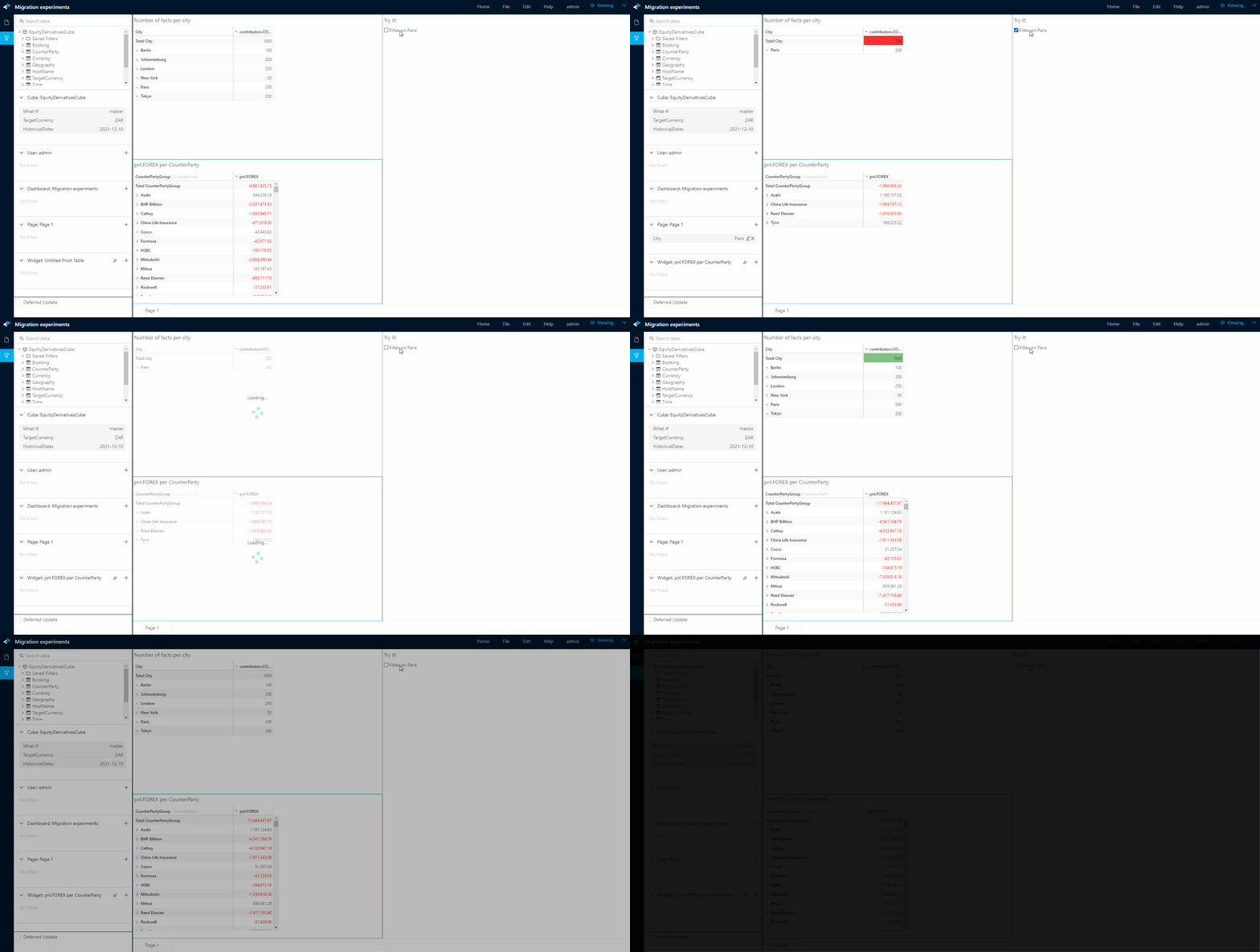
- pluginWidgetCustomFilter.tsx
View v4 util functions
View v4 util functions
- isFilteredOnParis.ts
- getUpdatedPageFilters.ts
View v4 plugin registration
View v4 plugin registration
- en-US.json
- App.tsx
- pluginWidgetCustomFilter.tsx
View v5 util functions
View v5 util functions
- isFilterOnParis.ts
- getUpdatedDashboardState.ts
View v5 plugin registration
View v5 plugin registration
- plugins.ts
How to access state?
containerApi object used to let you interact with specific bits of state through getters and setters.
Now you get a dashboardState prop instead, representing the whole state of the current dashboard. See WidgetPluginProps for more details.
This comes with benefits:
dashboardStateis typed, making it easier to find the parts of it that are relevant to the task at hand, for instance by leveraging the autocompletion feature of your code editor.- its attributes are referentially stable, allowing us to leverage memoization. Here, we could memoize our Component based on
pageState.filters, as it does not depend on anything else. There is no point in wasting resources to rerender it when the user edits things other than filters, as we know that it will never be visually impacted in this case.
Updating big objects is not always trivial, especially when you pay attention
to not mutating them. For this purpose, we recommend using
immer. It makes these operations less
error-prone, and also nicer to write and to read! It is used in the v5 util
functions above.
How to register extensions?
This is visible in the plugin registrations above.createActiveUI.
Now, you must add them to a configuration object in your index.ts file. This is because Atoti UI 5 is a build with extension points, whereas ActiveUI 4 was a sandbox, that you cloned when starting your project.
This change also comes with benefits:
- your project now only contains your own files.
- it builds and starts faster.
- future migrations will be easier: updates made by the Atoti team to the sources of Atoti UI will be transparent to you, as they should be.
The form of filters
Notice that filters used to be represented as strings, whereas they are now represented as Mdx objects. This is visible in particular in the signature of the util functions. This change allows your extension - and Atoti UI 5 in general - to be more performant.More possibilities for error handling
Atoti UI 5 comes with exhaustive definition types and typeguards. Below is an example where our v4 code would have thrown an error if someone tried to use our extension outside a dashboard (for instance, in an Atoti notebook). After the migration, TypeScript does not allow us to write unsafe code. And typeguards (such as isWidgetInDashboard) make our code more robust.You developed an application using the Atoti JavaScript API
The best strategy is to go through your@activeviam/activeui-sdk imports and replace them by equivalents in the new API.
In particular, note that Container can be replaced by Widget or Dashboard, depending on the use case.
To go further, you can read: integrate Atoti UI Components.